Token Connection to Customer's Webex Control Hub
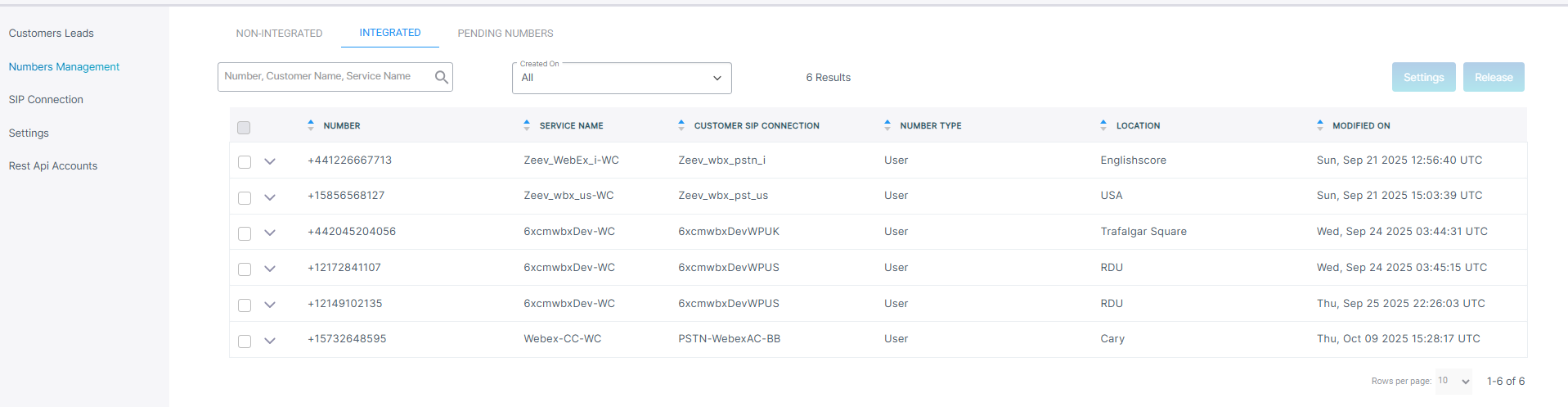
The Onboarding form includes a new 'Integrated' option to send a Token Invitation email to the customer tenant admin account to secure the connection between Live Platform and Webex Control Hub. Once the connection is established, locations added on Webex Control Hub are synced to Live Platform. The service provider or channel reseller can then attach one of the synced locations to the customer, add the SIP connections and then upload numbers. The uploaded numbers are then also synchronized to the relevant site location on Webex Control Hub. The Onboarding form also includes a 'Non-Integrated' option for managing both platforms separately without synchronization. The uploaded numbers are divided into separate tabs, 'Non-Integrated' and 'Integrated' according to the Onboarding configuration.
The Token connection also enables the daily synchronization of the following License usage parameters with the Webex Control Hub:
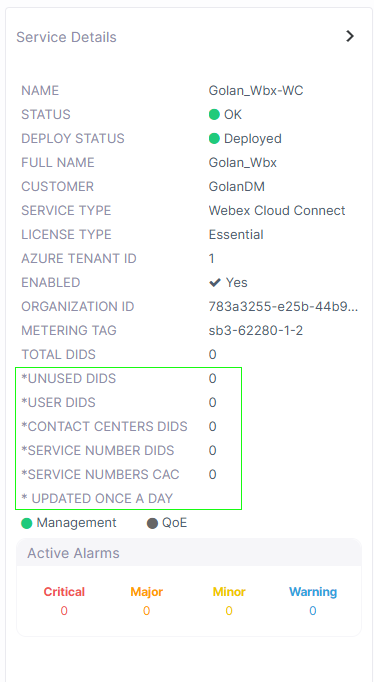
| ■ | Unused DIDs: The total number of DIDs that are not yet assigned to users. |
| ■ | User DIDs (assigned DIDs): The total number of DIDs assigned to customer tenant of number type "user" for user voice calling. |
| ■ | Contact Center DIDs: The total number of DIDs loaded to customer tenant of number type Contact Center. |
| ■ | Service Number DIDs: The total number of DIDs loaded to customer tenant of number type 'Service' for service numbers such for applications such as Fax IVR and Emergency calling. |
| ■ | Service Numbers CAC: The total CAC value aggregated for the Service numbers DIDs. |
This is indicated in the Service Details, see * in the figure below.